Our daughter Gabrielle spends a lot of time making digital drawings and simple animation and her outputs show a lot of potential. She’s very prolific when she’s in the mood to draw and make animations which we upload in our KidTechLab Youtube Channel.
In order for her to further improve her skills, we bought her the Huion HS64 Pen Tablet.
Unboxing Huion HS64
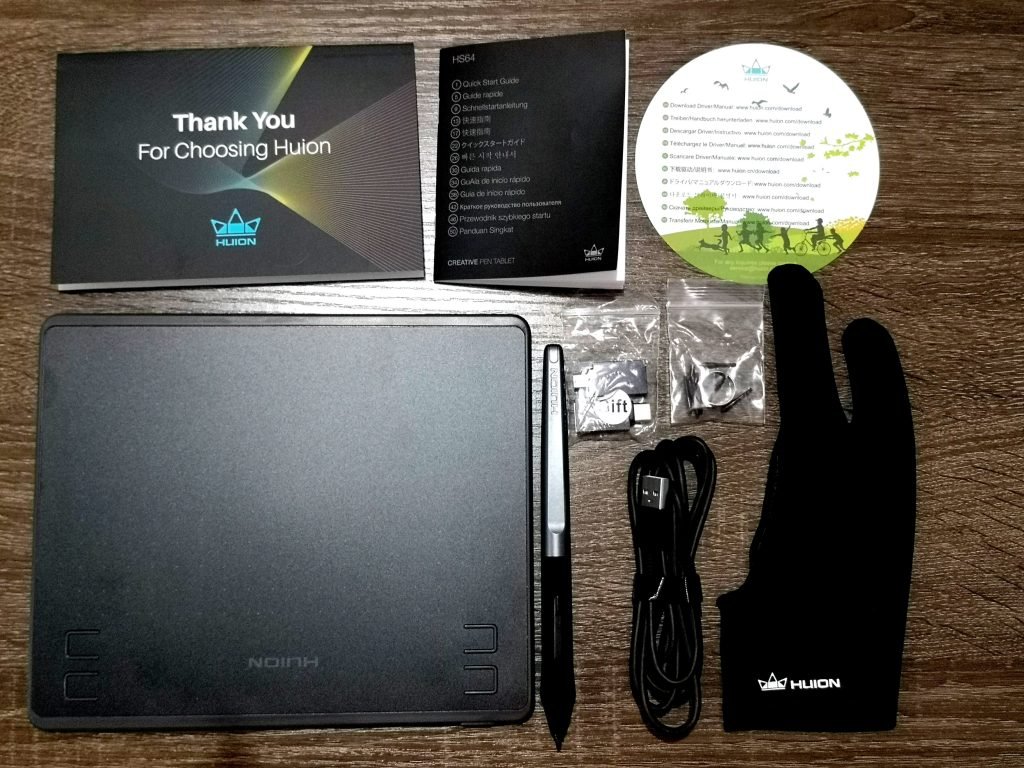
What comes with the box are pretty much what a beginner needs to start drawing using the Huion HS64. The following are what you’ll get with your purchase.
- HS64 Pen Tablet
- Battery-free Pen PW100
- Micro USB Cable
- Pen Nibs x 8
- Pen Nib Clip
- USB Adapter
- Artist Glove
- Quick Start Guide
Watch our unboxing video below.
Setup
Huion HS64 is not a standalone drawing tablet for kids. You need to connect it to PC or other devices. This tablet works with a desktop/laptop computer and supports Android devices. It’s very easy to setup, you just plug it and open your drawing app and it works just fine. You only need to install the driver if you want to program the keys. So far, we’ve tried using it with PicsArt for Android (Huawei P20 Pro and Samsung Tab S5e) and Photoshop in a PC and it works perfectly. It’s supposed to work with iOS devices but we haven’t tried it.
Tablet
The tablet size is around 6.3x4in, 7mm thick and weighs 258g. The size is just perfect for a kid and since it’s thin and lightweight, it’s easy to carry around when traveling. The surface is slightly rough and makes a scratchy sound when you write over it. It’s not much of a bother for us but may be an issue for some. It has four keys programmable which you can pre-set using the installed driver.
[easyazon_image align=”center” height=”500″ identifier=”B07NZ4DQP8″ locale=”US” src=”https://kidtechlab.com/wp-content/uploads/2021/07/41W6T0yi1DL.SL500.jpg” tag=”kidtechlab-20″ width=”500″]
Pen
We really love that the pen is battery-free. It glides easily on the tablet surface. It’s comfortable to hold and pressure-sensitive. You can assign the functions on the buttons using the Huion driver software. The box also come with 8 pen nibs and nib clip to easily replace the nib.
Drawing Glove
The drawing glove is very lightweight and comfortable. It’s a little loose for my daughter’s hand but fits perfectly in mine.
What we like
- Easy to setup
- Small and lightweight, perfect for kids
- Works well with Android devices
- Very affordable
Can be improved
- Tablet surface is a little rough
Conclusion
We’re really surprised with the quality and affordability of Huion HS64. This little device packs a lot of value for money. If you’re thinking of getting a drawing tablet for a beginner, then you should consider Huion HS64.

Leave a Reply