If you’ve been searching for the best tablet for kids, I’m sure you’ve come across the Nabi 2 Tablet. A lot of parents are considering buying Nabi 2 tablet because it’s one of the top rated tablets for kids based on online reviews. This kids tablet is actually a full-featured Android tablet particularly designed for kids but as you can see in its technical specs below, it has enough processing power and storage for grownups too.
Nabi 2 Technical Specs
Below is the Technical Specs of Nabi 2.
| Parameters | Fuhu Nabi 2 Specs |
|---|---|
| Display | 7 Inch Multi-Touch Capacitive Touch Screen 1024 x 600 Pixel Resolution |
| Processor | NVIDIA® Tegra® 3 Mobile Processor with Quad-Core CPU and 5th Battery-Saver Core |
| Storage | 8GB, Expandable via MicroSD (Up to 32GB) |
| Memory | 1GB RAM |
| Camera | 2MP Front Facing Camera 720p Video |
| Battery | 3,850 mAh Rechargeable Lithium-ion Battery |
| Size & Weight: (with Drop-Safe Bumper) | Width: 8.69 Inches (220.8 mm) Height: 6.05 Inches (153.7 mm) Depth: 1.14 Inches (29.08 mm) Weight: 1.31 Pounds (596 g) |
| Operating System | Android 4.0, Ice Cream Sandwich |
| Network | Wi-Fi 802.11 b/g/n Bluetooth 3.0 |
| Input/Output | Micro USB 2.0 Port Mini HDMI MicroSD Compatible Cartridge Slot 3.5 mm Standard Audio Jack Built-In Microphone DC Connector |
As you can see in the Nabi 2 technical specs above and based on our tablets for kids comparison table, the Nabi 2 has the most powerful specs, even beating some adult tablets. But does a kid’s tablet need that much processing power? Maybe not, but remember that the tablet’s processing power determine how fast and responsive it will run games and apps and considering the short attention span of kids, this will affect their user experience.
Another nice feature the Nabi 2 has, which most adult tablets don’t have, is its HDMI output. This allows you to stream children’s programs and watch them on a regular TV. Kids would love to watch Dora The Explorer on a large screen.
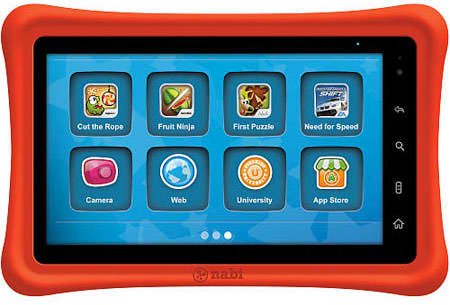
Sturdiness and Durability
The Nabi 2 comes with a brilliant orange bumper which is made of FDA-approved, food-grade silicone, so you don’t have to worry if your child will chew on it. This bumper is designed to make the Nabi shock resistant and there are several test-drop videos on YouTube proving this claim such as this video below.
The Nabi 2 comes with a customizable colored blocks you attach at the back of the tablet designed to personalize your child’s Nabi. Most parents are concerned that while this is a nice idea, these blocks could pose a choking hazard to younger children.
Nabi 2 Software and Apps
The Nabi 2 comes preloaded with $200 worth of child-friendly apps which includes: 25 free games, 50 free songs, 30 free books, a free trial of Spinlets TV featuring Cookie Jar TV, and a free trial to Fooz Kids. The pre-installed MeeGenius app comes with 30 preloaded chidrens’ books with audio tracks for reading along. In addition, popular games such as the full version of Angry Birds and Fruit Ninja are also pre-installed.
Also included out of the box are four primary educational apps for Math, English, Social Studies, and Science. These apps feature colorful and easy-to-navigate interfaces. The kids can answer the quizzes after they finish their lessons. The results of the quizzes are immediately uploaded to Fuhu’s Web-based N-Site which the parents can access in their Parental Dashboard in order to monitor how well their children perform on the specific subject.
The ability to access the apps from Amazon Store is one the advantages of Nabi 2 over the other tablets for kids. Nabi 2 out of the box but It can be tweaked to access Google Play but unfortunately, you can only have limited access such as purchase of books, magazines and music but not apps. However, in adult mode, the parents can have access to a number of apps for kids and adults from the 50,000 apps in Amazon Appstore and 500 kid-friendly apps in Nabi App Zone.
One of the nice apps the Nabi 2 comes with is a scheduling app that allows parents to assign chores and tasks and reward children for completing them. Nabi coins are awarded if they complete the chores which they can use to purchase new apps for their tablet. Unfortunately, you need real money to purchase Nabi coins.
Nabi 2 Parental Controls
Fuhu has given Nabi 2 one of the most robust parental controls on a tablet for kids. Nabi 2 has a split mode, the child-friendly Nabi Mode and the adult mode called the Mommy/Daddy mode. In Nabi Mode, the kids have limited access in the settings and standard apps and parents can also put restrictions on the websites the kids can visit and the type of videos they watch. Parents can create separate user profiles for each kid who use the Nabi 2 tablet.
Customer Service and Warranty
The Nabi 2 comes with a one-year limited warranty, plus 24/7 tech support. Nabi 2 also has its own Nabi MD app, which monitors your tablet’s performance and can send information on system errors directly to Fuhu. If an error is detected, a Fuhu representative will reply to you and offer advice on how to fix the problem.
Of course, that doesn’t happen always, so in addition, Nabi users can request for technical support from the Nabi website and Facebook Page. What I like about the Nabi is its growing community of Fan-A-Techs who provide technical support to fellow Nabi users through the Nabi website, Facebook and their blogs.
Customer Reviews
The average rating for the Nabi 2 at Amazon.com is 3.2 out of 5 stars. It has received a lot of positive reviews from buyers at Amazon.com as well as from parents and tech experts. Most of the raves are because of its powerful specs, robust parental controls, and access to educational apps.
What customers don’t like about the Nabi 2, first and foremost, is the price. At $199 it is comparable to the price of adult tablets. Although, its specs are really at par and even surpass most tablets, some parents are still afraid to let their kids handle a tablet with this price tag.
Final Thoughts
Overall, the Nabi 2 Tablet is essentially a full-featured tablet which comes in a child-friendly body which is built to survive rough times in the hands of your kid. Although its 7-inch screen may be a little bigger for small kids, it is a tablet that can grow with them. Although the price tag is high, the benefits and the power of the Nabi 2 makes it ahead of the other “kiddie” tablets. Nabi 2 is built with the same components of higher-end tablets, and even better than some with the inclusion of both a microSD card slot and mini HDMI out.The impressive collection of pre-installed games, educational apps, and useful tools for parents makes Nabi 2 one of the best, if not the best tablet for kids.
Dec 19, 2013 Update
Google Play is Now Available in Nabi 2
Fuhu Inc. finally made Google Play Store available in Nabi 2 tablet. The 2-part Over-The-Air update will also upgrade the tablet to 4.1 Jelly Bean. A lot of Nabi 2 owners will be happy with this news since this will give the users access to over one million of games and apps as well as millions more of digital content such as movies, videos and music. With this update, Google’s most popular utility apps such as Google Maps, Google Messenger, Gmail and Google Calendar will also be available in Nabi 2. With an impressive technical specs, fast performance, excellent parental controls and now combined with access to Google Play Store, Nabi 2 is truly the top choice in tablets for kids.
View a Hands-On Review of Nabi 2 Tablet Below

Leave a Reply