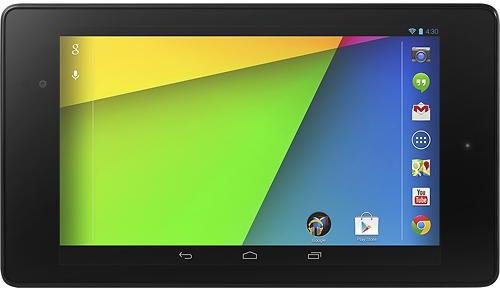
Google Nexus 7 (2013) is another grown-up tablet which can be used by kids. The new Nexus 7 now comes with better parental controls which lets parents set individual profile for each kid with their specific restrictions.
Nexus 7 Technical Specs
Below is the technical specs of the second generation Nexus 7
| Parameters | Google Nexus 7 (2013) Technical Specs |
|---|---|
| Display | 7.0 inches (~323 ppi pixel density) 1200 x 1920 pixels resolution, LED-backlit IPS LCD capacitive touchscreen |
| Processor | Quad Core 1.5 GHz Krait Adreno 320 GPU Qualcomm Snapdragon S4Pro |
| Storage | 16GB and 32GB options, non-expandable |
| Camera | Main: 5 MegaPixels, 2592 х 1944 pixels, autofocus, no flash Front: 1.2 MegaPixels |
| Battery | 9 Hours of Multimedia use |
| Size & Weight: | 200 x 114 x 8.7 mm, 290 grams |
| Operating System | Android 4.3 Jelly Bean |
| Network | Wi-Fi 802.11 a/b/g/n, Bluetooth 4.0, LTE Variant |
| Input/Output | 3.5 mm audio jack, microUSB v2.0, USB On-The-Go support |
The second generation Google Nexus 7 is the first tablet to run on Android 4.3 (Jelly Bean) and is powered by a Quad-core 1.3GHz Snapdragon S4 processor so it can run intense games smoothly. Younger kids may not notice the higher resolution but older kids would appreciate the 7-inch, 1920×1200 resolution HD screen.
Click here to Know More About Nexus 7 (2013) at Amazon.com
Unlike its predecessor, the Nexus 7 generation 2 now a 5 megapixels rear camera in addition to the 1.2 megapixels front facing camera. Expect kids to take a lot of photos and videos so has more storage is needed. Parents have a choice between a Nexus with a 16GB or 32GB of storage. The Nexus 7 is fairly durable, but parents may want to invest in a case to add protection.
Sturdiness and Durability
Expect any device to undergo some rough times in the hands of a kid. Expect it to be dropped, stepped on, and worse, fall on water. But the new Nexus 7 is a hardy device which can take a beating. After undergoing a durability test from SquareTrade, a company that offers warranty for electronics, the Nexus 7 proved to be more durable than its predecessor and the iPad Mini. The new Nexus 7 performed best among the three devices after undergoing a 5-foot drop test, a slide test and a water dunk test.
Although it is considered more durable , getting a good protective case for the Nexus 7 is still advised before handing it over to the kids.
Nexus 7 Software and Apps
The Nexus 7 runs on the latest version of Android OS – that’s Android 4.3 Jelly Bean. Most industry experts consider the Google Nexus 7 as the best 7-inch tablet in terms of performance but as a kid’s tablet, what value does it offer in terms of educational apps? As an Android tablet, the Nexus 7 gives you access to thousands of games and educational apps in Google Play Store. The app prices range from free to several dollars so compared to buying cartridges, downloading apps may turn out to be cheaper.
Parental Controls
The new Nexus 7 now comes with better parental controls. This is a feature of the Jelly Bean 4.3 which lets device administrator (parents) create individual profiles for each user (kids) with restrictions. Parents can now choose which apps to enable to the kid’s profile. There’s also maturity filters and options to enable or disable features such as the cameras and browser.
Customer Reviews
Tech experts tout the Nexus 7 as the best 7-inch tablet in terms of performance and it has improved on the faults of its predecessor. But as a potential buyer, you would normally be interested to know what users think about the 2nd gen Nexus 7. Based on customer reviews at Amazon.com, 228 out of 415 users gave it a 5-star rating with average rating of 3.9 stars. Users are impressed with its graphics, speed and sound quality.
The downside that most buyers point out is the lack of SD card slot for storage expansion. But as a kids tablet, I don’t think this will be much of a problem. The 16GB internal storage is more than enough for photos, videos, games and apps that kid’s usually use. Besides, it has a micro USB port for easy file transfer.
Final Thoughts
Tech experts tout the Nexus 7 as the best 7-inch tablet in the market and its with good reasons. It has a powerful hardware that comes in a sturdy body and a price tag that’s hard to beat in the market. Although not as powerful as Kindle FreeTime, the parental controls of Nexus 7 is better than the restriction settings of the iPad Mini.
Like the other two adult tablets in our tablet comparison table, the Nexus 7 tablet is one that can grow with a child. They can use it to access games and educational apps when they are younger and as a homework companion as they grow. All in all, the new Nexus 7 offers the most value for money and is one of the best adult tablets for kids.

Leave a Reply