Samsung Galaxy Tab 3 Kids is the latest addition to the growing kids tablet available in the market today. The Samsung Galaxy Tab 3 Kids has essentially the same specs as the Galaxy Tab 3 bundled with custom software for kids and retails for $229.99. Just like Nabi 2, Galaxy Tab 3 Kids also has dual mode – adult mode and kid’s mode. So, is Samsung Tab 3 Kids the best Android tablet for kids? Let’s take a look at its technical specs below.
| VTech Kidizoom DX | No | No | Camera and voice recording | [amazon_link asins='B013ULFO7O' template='ProductAd' store='kidtechlab_plugin-20' marketplace='US' link_id='3f3d05db-5760-11e7-8aad-078eb9dd2fcc'] |
| HereO Family | Yes | No | No | [amazon_link asins='B06Y6JCTKH' template='ProductAd' store='kidtechlab_plugin-20' marketplace='US' link_id='d9ff2ae6-5443-11e7-b87a-db7fa7bca776'] |
| LeapFrog LeapBand | ||||
| dokiWatch |
Samsung Tab 3 Kids is in bright yellow color and with a kid friendly bright orange silicone case. Those who want a sturdier case may opt for the Kid Grip Cover ($69.95). It’s a hard plastic case with handle which can also function as a stand and comes with a C pen stylus.
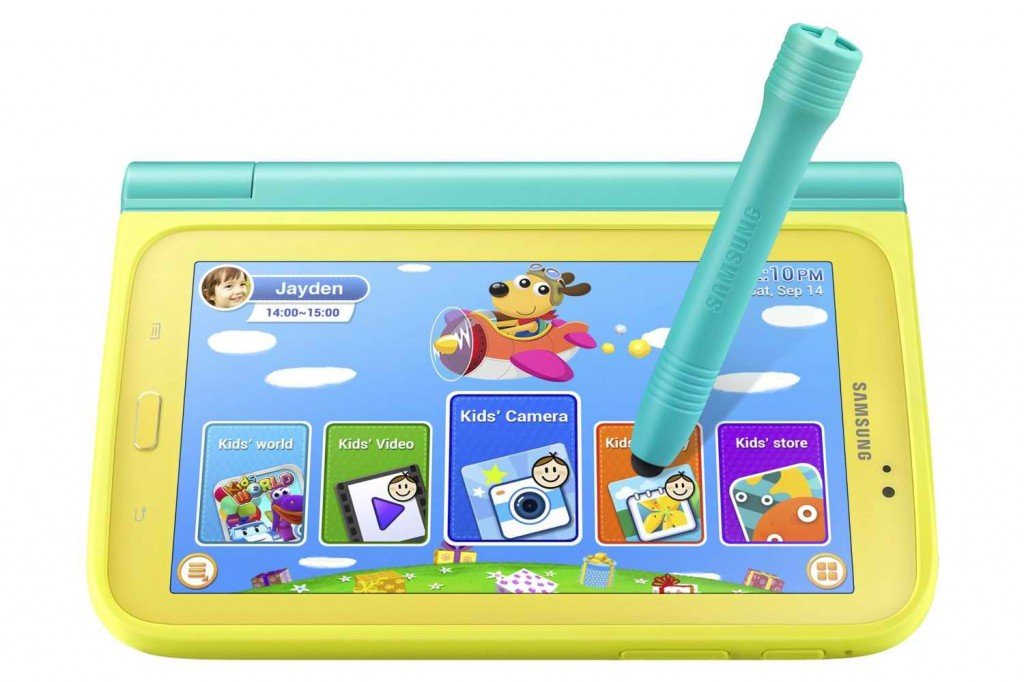
But don’t be fooled by the kiddie exterior, as mentioned, the Samsung Galaxy Tab 3 Kids is a fully functional Android Jelly Bean tablet. It also comes with a 3-megapixel rear-facing camera and a front-facing 1.3-megapixel camera.
Click Here to Read More Features of Samsung Galaxy Tab 3 Kids
Software and Apps
Out of the box, the Samsung Tab 3 Kids comes pre-loaded with a number of games, e-books, and education and entertainment apps. There’s an on-board 8GB of memory for apps, videos and music which can be expanded to 32GB via a microSD card.
The Kids Mode home screen is in carousel interface with bright and large icons to make it easy for small fingers to tap. In adult or standard mode, the tablet has the same settings and features as a Samsung Android tablet. Unfortunately, you cannot upgrade your existing Galaxy Tab 3 to include the Kids Mode. You have to buy the kids version.

Parental Controls
Parents can choose the apps, limit the usage time as well as the specific period for use in the Kids Mode. Parents can also enable other apps they’ve downloaded on the tablet to be accessible in Kids Mode so they are not restricted to the Samsung Kids Store only. Unfortunately, you cannot create multiple separate accounts in Samsung Tab 3 Kids. Although the Tab 3 Kids can still be shared, this feature is very helpful if you want to set individual settings to each user.
Customer Reviews
Customer review of the Samsung Tab 3 is very impressive at 4.3 out of 5 stars. They like how easy it is to switch from Kids Mode to standard mode with the touch of a button and password. Customers also find it practical that the tablet can be set to a standard mode so that the adults can use it also as a regular Android tablet.
Click Here to Read More Customer Reviews on Samsung Galaxy Tab 3 Kids
Final Thoughts
As a dedicated kids tablet, the Samsung Tab 3 is on the pricey side. As a family tablet, it’s a good buy and it can compete with the Nabi 2 and other grown up tablets in terms of technical specs and performance. Although the parental controls of Samsung Tab 3 may not be as comprehensive as the Kindle Fire, it still has most of the necessary features parents look for in order to restrict their kids use of the tablet. Another advantage of the Samsung Tab 3 Kids is its access to a wide range of apps at Google Play in addition to Samsung Kids Store. Before handing over the $229 tablet to your kid, make sure to make it more durable. The bumper case will help protect the tablet but the Kid Grip cover with stylus will provide added protection so you might as well consider investing since the Samsung Tab 3 Kids is a versatile tablet and will be useful for several years with proper care and protection.
Click Here to Grab Special Offer for Samsung Galaxy Tab 3 Kids at Amazon.com
Below is a comprehensive review of the different features of the Samsung Galaxy Tab 3 Kids to help you decide.

Leave a Reply